
I turned our office floor into a pixel-art game
Deskpotter is a live map of our real office. You can walk up to a coworker, talk to them, high five them, or carry them around on your shoulders.
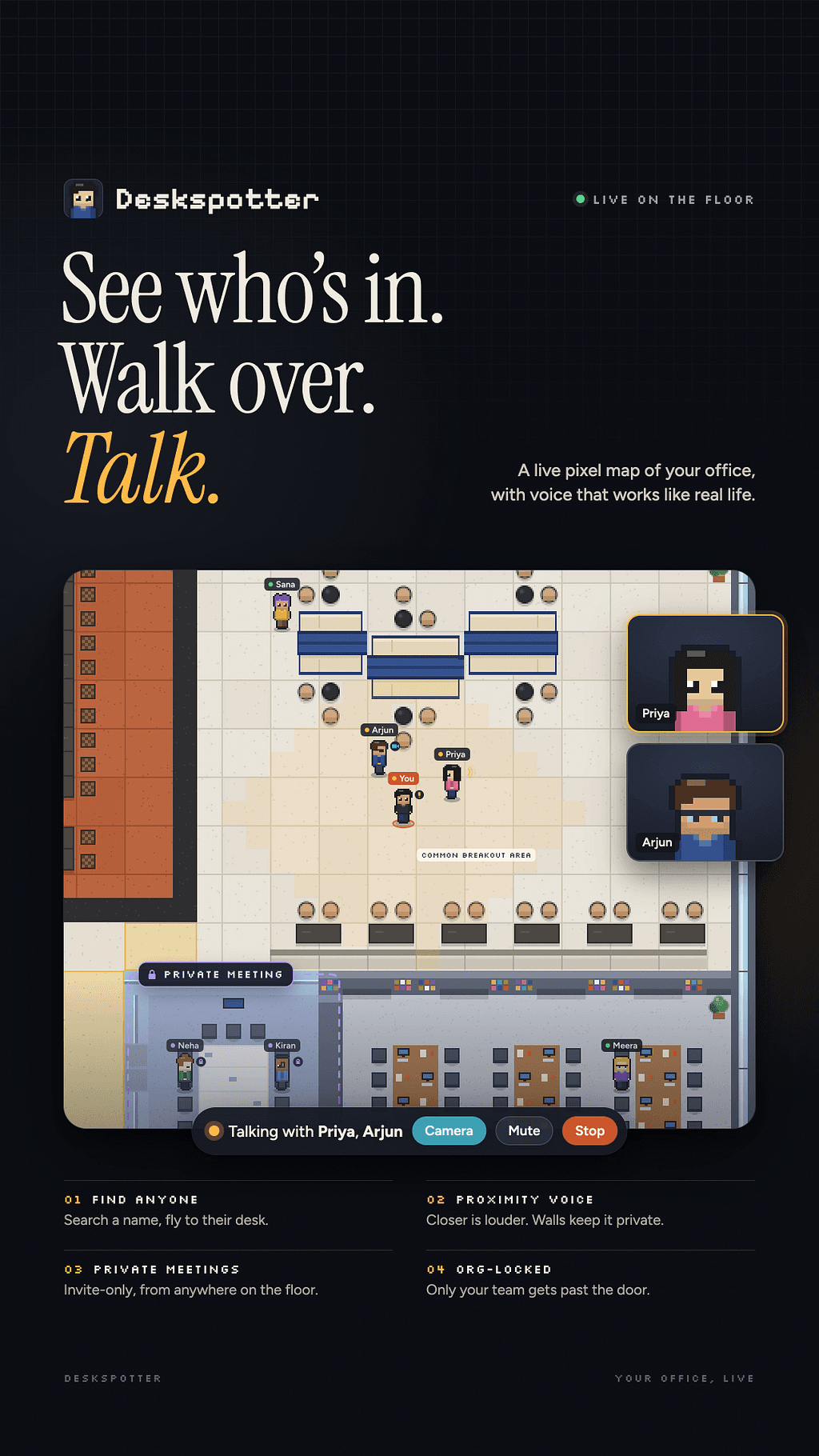
Deskpotter is a live map of our real office. You can walk up to a coworker, talk to them, high five them, or carry them around on your shoulders.
The problem: “Where are you sitting today?”
Several companies share our office floor, and my team sits at hot desks. Nobody has a fixed seat, so where someone sits changes every day.
That leads to a small, everyday annoyance. When you need someone, you either walk around the floor looking for them or message them to ask where they are. “Where are you sitting?” “Near the cafe.” “Which side?” Then you walk over anyway.
It isn’t a big problem, but it comes up all the time, and it makes the office feel more scattered than it is.
The inspiration: WorkAdventure and friends
I’ve always liked virtual-office apps such as WorkAdventure, Gather and others like them. You get a little pixel character on a 2D map. You walk around, and when you get close to someone you can talk to them. It feels more like a game than a tool, and that’s why it works.
Two things put me off using one of them for our office:
The map wasn’t our office. They give you a made-up world or a template office. I wanted our floor: the same rooms, the same corridors and the same cafe, so the map is actually useful for finding people.
Payment. The polished versions usually come with subscriptions, per-seat pricing or limits once your team grows. I didn’t want to ask anyone for a credit card for something meant to be fun.
So I built my own.
Meet Deskpotter
Deskpotter is a pixel-art map of our office floor. Everyone puts their character where they’re sitting, and everyone else sees it live. If you want to find someone, open the map and look.
An exact map of the office
The map is traced from the building’s evacuation plan, the one on the wall next to the lifts. Everything is where it really is: the M01–M19 offices, the team cabins and pods, the lift core, meeting rooms, breakout areas and corridors. I redrew the common breakout area and the cafe seating from real photos, and our own team area is drawn as an open space with three long bench tables, just like it is in real life.
When you see your coworker’s character at the second bench table by the window, that’s where they are.
Walk around like it’s a game
Click anywhere on the map to walk there, or use the arrow keys / WASD.
Hold Shift to run.
Characters have outfits, a walk cycle, and they blink.
Go full width or full screen when you want the map to fill the screen.
Nothing tracks you. Your character stays where you last put it, and anyone who hasn’t updated in 12 hours fades out, so old positions don’t send you to an empty desk.
Talk to whoever’s nearby
This is the WorkAdventure part, and it’s my favourite.
Proximity voice: walk up to someone and press Shift+S. Anyone within earshot who has their mic on can hear you, and the closer you stand, the louder you are.
Walls block sound. A closed meeting room on the map is private, just like a real one.
Camera (optional): press Shift+V and the people you’re talking to see a small video tile.
Ring someone: if a coworker’s mic is off, walk up to them and press Shift+R. They hear a ringtone and get Answer or Not now.
Private meetings: invite-only calls. Others see a padlock and can ask to join, and the host decides who gets in.
The silly stuff (the important stuff)
I wanted the office to feel a bit more alive, so there are actions:
Reactions over your head: wave, love, LOL, party (with confetti), “coffee?”, nice, dance and nap. Keys 1–8 fire them instantly.
High fives: stand next to someone and click them.
Paper balls: throw one at a coworker from across the room.
Pokes: they get a little ping.
Piggyback rides: ask to carry someone. If they say Hop on, they ride over your head while you walk around the floor (a little slower). They can jump off or wriggle free with any arrow key.
None of it is productive. That’s the point.
No payment, ever
Deskpotter runs entirely on free tiers:
Vercel serves the site. It’s plain HTML, CSS and JavaScript with no build step.
Supabase stores one row per person and pushes live updates, so every open map moves when someone moves.
WebRTC carries voice and video straight between browsers, peer to peer, so calls never pass through a paid server.
An optional free TURN relay helps calls connect on strict office Wi-Fi.
There are no subscriptions, no seat limits and no card details. A big part of the work went into staying inside the free limits, for example by sending call setup straight to the one person it’s for and rate-limiting reactions, so the whole office fits on a free plan.
Keeping it to our office
Fun shouldn’t mean public. The map is locked behind an org ID. Until you enter it, you see nothing: no names, no positions and no calls. The lock is enforced by the database, not just the screen. Each person can only move their own character, and a few admins can tidy up the map or set it to reset every night.