Why I Built ZeroBoard: A Better Way to Practise Whiteboard Interviews
Find it here : https://www.zerononsense.space/
Find it here : https://www.zerononsense.space/
Whiteboard interviews are one of the hardest parts of a product design interview to prepare for.
Not because there is one perfect framework to memorise. And not because candidates do not know how to design.
They are difficult because the format tests many things at once.
You are given a vague prompt. You have limited time. You need to ask the right questions, define the problem, choose a user, make trade-offs, sketch a solution, explain your thinking, and respond to an interviewer in real time.
Most preparation material helps with only one piece of that.
You can read frameworks. You can watch mock interviews. You can find a list of common prompts. You can open a blank whiteboard and practise by yourself.
But the real challenge is putting all of it together under time pressure.
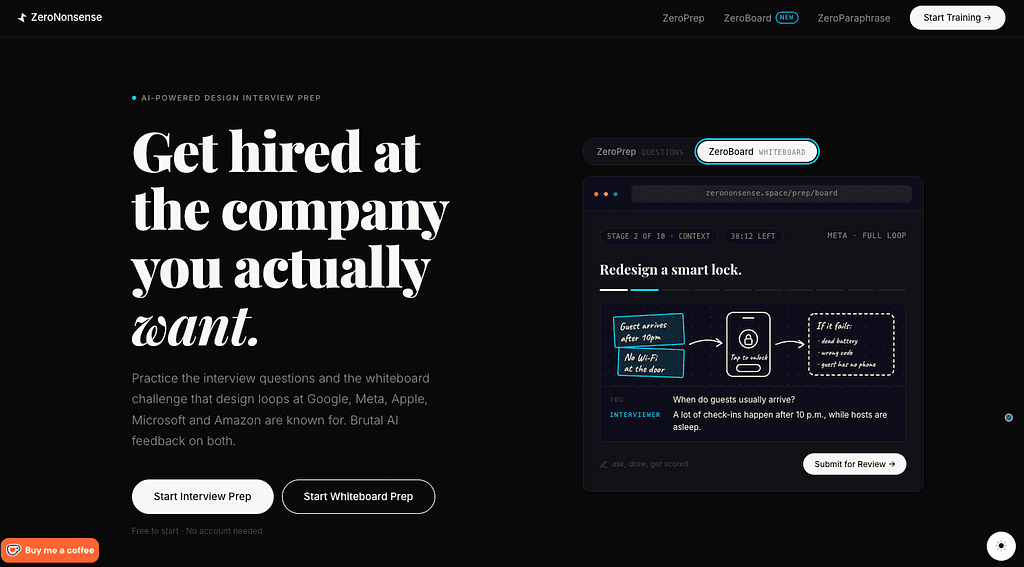
That is why I built ZeroBoard, a new feature in ZeroNonsense for practising product design whiteboard rounds.
The problem with practising alone
When people practise whiteboard challenges alone, it is easy to jump straight into screens.
That is usually not where a strong answer starts.
A good candidate first clarifies the prompt. They ask about the business, the users, the context, the constraints, and what success looks like. They narrow a broad problem into something they can solve well in the time available.
Then they explore options, make a decision, explain what they are giving up, and draw only what helps communicate the solution.
The problem is that this is hard to simulate alone. A blank board cannot challenge your assumptions. A framework cannot tell you whether you asked useful questions. And a generic answer cannot show you where your own reasoning became unclear.
ZeroBoard is my attempt to make that practice loop more realistic and more useful.
A practice round that behaves more like an interview
ZeroBoard starts with a curated library of whiteboard-style product design prompts.
These prompts come from candidate reports and established interview-prep resources. Each prompt clearly shows its source and category, whether it is a candidate-reported prompt, a prep-guide prompt, a classic question, or simply a good practice exercise. They are not presented as confirmed company questions.
You can browse prompts by company, topic, and source, or let ZeroBoard give you one without seeing it in advance.
From there, there are two ways to practise:
A 45-minute full whiteboard round
A 15-minute warm-up focused on the early framing work
The full round follows a structured 10-step path:
Frame the prompt
Understand the context
Choose a primary user
Define the problem
Set constraints
Define success
Map the journey
Explore ideas
Draw the flow
Wrap up the recommendation
The structure is there to guide thinking, not force every answer into the same template. The goal is to help people build the habits that make a whiteboard answer feel clear and intentional.
The interviewer is part of the experience
One part I care a lot about is the AI interviewer.
In a real interview, the interviewer has context that the candidate does not. They may know business goals, current user pain points, constraints, or details about the existing experience. But they usually do not hand all of that information to you at the beginning.
You have to ask.
ZeroBoard recreates that dynamic. The interviewer responds to your clarifying questions and reveals relevant context only when you ask about it.
This matters because asking good questions is not a formality. It changes the quality of the solution.
If you never ask who the user is, you may design for everyone. If you never ask about the business goal, you may optimise the wrong thing. If you ignore accessibility, privacy, or technical constraints, a polished-looking solution can still be weak.
The chat is designed to make this part of the interview visible. It encourages candidates to slow down, investigate the problem, and avoid treating the prompt as a screen-design exercise.
A board for showing the work, not just writing about it
For the full round, ZeroBoard includes a drawing canvas where candidates can sketch flows, screens, states, and ideas as they work.
The board sits alongside the structured stages, the clock, and the interviewer conversation. That means candidates can move from defining the problem to mapping a journey, comparing concepts, and finally drawing the selected flow in one place.
The timer is intentional too.
A good whiteboard answer is not only about what you say. It is also about how you manage the time. Spending 20 minutes on clarifying questions may leave too little room for ideas and screens. Jumping into UI too early can leave the core problem undefined.
After a round, ZeroBoard shows where time went across each stage, so candidates can spot patterns in their own practice.
Feedback that goes beyond a score
At the end of a session, the candidate submits their notes, interviewer conversation, and board for review.
The AI review looks at areas such as:
Framing the problem
Choosing and justifying a user
Exploring ideas and trade-offs
Flow and product detail
Success metrics and impact
Communication and time management
It gives an overall score, but the score is not the point.
The useful part is the evidence and the next step. The review calls out what was strong, where the reasoning was incomplete, what context was missed, and what the candidate could do differently next time.
It also shows the hidden facts that were available through the interviewer, so candidates can see whether they asked the questions that would have improved their answer.
The goal is for a person to finish a round knowing more than “I got 68 out of 100.” They should know what to practise next.
Practising prompts beyond the library
ZeroBoard also has a second path for candidates who already have a prompt they want to work through.
They can paste in a whiteboard challenge from a past interview, a mock interview, a design community, or their own practice list. ZeroBoard then creates a structured worked answer that walks through the problem stage by stage.
It covers how to frame the prompt, what clarifying questions to ask, how to choose a user, which constraints to consider, how to explore ideas, what to draw, and how to close the answer.
The intention is not to give people something to memorise.
It is to show how the same structured thinking can be applied to different kinds of problems and help candidates practise from multiple perspectives.
What I hope ZeroBoard helps people build
The best whiteboard interviews are not about drawing the prettiest screens or finding a magical answer.
They are about showing how you think when the problem is incomplete.
Can you reduce ambiguity? Can you make a decision with limited information? Can you explain your trade-offs? Can you keep the user, the business, and the constraints in view at the same time?
That is what I want ZeroBoard to help people practise.
It is still something I am building and refining, but I am excited about the direction: a place where candidates can practise the whole whiteboard loop, learn from each attempt, and walk into the actual interview with more structure and confidence.
Find it here : https://www.zerononsense.space/